<?xml version="1.0" encoding="utf-8"?><feed xmlns="http://www.w3.org/2005/Atom" ><generator uri="https://jekyllrb.com/" version="4.3.4">Jekyll</generator><link href="/feed.xml" rel="self" type="application/atom+xml" /><link href="/" rel="alternate" type="text/html" /><updated>2026-09-13T17:50:15+04:00</updated><id>/feed.xml</id><title type="html">Thomas Paul</title><subtitle>Techie, Husband, Deep learning Enthusiast, Traveler, and Lifelong learner.</subtitle><entry><title type="html">Interfacing CPP and Python using Python Boost</title><link href="/2021/08/202108Interfacing-CPP-and-Python-using-Boost.html" rel="alternate" type="text/html" title="Interfacing CPP and Python using Python Boost" /><published>2021-08-10T19:49:00+04:00</published><updated>2021-08-10T19:49:00+04:00</updated><id>/2021/08/Interfacing-CPP-and-Python-using-Boost</id><content type="html" xml:base="/2021/08/202108Interfacing-CPP-and-Python-using-Boost.html"><![CDATA[<p>Sometimes there will be situations where we need to pass data between CPP and Python codes. We can use Boost. Python to interface between CPP and Python. In this note, let’s see how to call CPP functions from Python and transfer Numpy arrays between them.</p>

<h3 id="test-system-configuration">Test System Configuration</h3>
<ul>
  <li>Ubuntu 20.04 LTS on WSL 1, Windows 10</li>
  <li>Python 3.8</li>
  <li>Boost 1.71 [To see Boost version, open up <code class="language-plaintext highlighter-rouge">/usr/include/boost/version.hpp</code> and look for <code class="language-plaintext highlighter-rouge">#define BOOST_LIB_VERSION</code>]</li>
</ul>

<h3 id="install-dependencies-if-needed">Install dependencies, if needed</h3>
<ul>
  <li><code class="language-plaintext highlighter-rouge">sudo apt-get install libboost-all-dev</code></li>
  <li><code class="language-plaintext highlighter-rouge">sudo apt install python-dev</code> or <code class="language-plaintext highlighter-rouge">sudo apt-get install python3-dev</code> depending upon the Python</li>
  <li><code class="language-plaintext highlighter-rouge">sudo apt install libboost-numpy-dev</code></li>
</ul>

<h3 id="find-out-library-names-and-their-paths">Find out library names and their paths</h3>
<p>We need the library names and their paths for linking.</p>

<ul>
  <li>Python - Find out where the <code class="language-plaintext highlighter-rouge">pyconfig</code> is [use <code class="language-plaintext highlighter-rouge">find /usr/include/ -name pyconfig*</code>]. In my system it was at <code class="language-plaintext highlighter-rouge">/usr/include/python3.8/</code>.</li>
  <li>Boost Python - use <code class="language-plaintext highlighter-rouge">find /usr/lib -name libboost*</code>. In my system, boost_python library was at <code class="language-plaintext highlighter-rouge">/usr/lib/x86_64-linux-gnu/libboost_python38</code>. So the name of the library is <code class="language-plaintext highlighter-rouge">boost_python38</code>.</li>
  <li>Boost Numpy - Just like Boost Python, I found out libboost_numpy was at <code class="language-plaintext highlighter-rouge">/usr/lib/x86_64-linux-gnu/libboost_numpy38</code>, and hence the library name was <code class="language-plaintext highlighter-rouge">boost_numpy38</code></li>
</ul>

<h3 id="code">Code</h3>
<p>We need to create a shared library (<code class="language-plaintext highlighter-rouge">.so</code>) using Boost by compiling <code class="language-plaintext highlighter-rouge">cpp</code> code and linking existing libraries (<code class="language-plaintext highlighter-rouge">boost_python</code>, <code class="language-plaintext highlighter-rouge">python</code>, <code class="language-plaintext highlighter-rouge">boost_numpy</code>).</p>

<h4 id="cpp-header-file---sample_interfaceh">CPP header file - <code class="language-plaintext highlighter-rouge">sample_interface.h</code></h4>

<figure class="highlight"><pre><code class="language-cpp" data-lang="cpp"><span class="cp">#ifndef SAMPLE_INTERFACE
#define SAMPLE_INTERFACE
#include</span> <span class="cpf">&lt;boost/python.hpp&gt;</span><span class="cp">
#include</span> <span class="cpf">&lt;boost/python/extract.hpp&gt;</span><span class="cp">
#include</span> <span class="cpf">&lt;boost/python/stl_iterator.hpp&gt;</span><span class="cp">
#include</span> <span class="cpf">&lt;boost/python/numpy.hpp&gt;</span><span class="cp">
</span>
<span class="k">namespace</span> <span class="n">np</span> <span class="o">=</span> <span class="n">boost</span><span class="o">::</span><span class="n">python</span><span class="o">::</span><span class="n">numpy</span><span class="p">;</span>
<span class="k">namespace</span> <span class="n">bpy</span> <span class="o">=</span> <span class="n">boost</span><span class="o">::</span><span class="n">python</span><span class="p">;</span>

<span class="k">class</span> <span class="nc">SampleInterface</span><span class="p">{</span>
    <span class="nl">public:</span>
    <span class="n">SampleInterface</span><span class="p">();</span>
    <span class="n">np</span><span class="o">::</span><span class="n">ndarray</span> <span class="n">foo_bar</span><span class="p">(</span><span class="n">np</span><span class="o">::</span><span class="n">ndarray</span> <span class="o">&amp;</span><span class="n">input_array</span><span class="p">);</span>
<span class="p">};</span>
<span class="cp">#endif // end of SAMPLE_INTERFACE</span></code></pre></figure>

<h4 id="cpp-definition-file---sample_interfacecpp">CPP definition file - <code class="language-plaintext highlighter-rouge">sample_interface.cpp</code></h4>

<figure class="highlight"><pre><code class="language-cpp" data-lang="cpp"><span class="cp">#include</span> <span class="cpf">"sample_interface.h"</span><span class="c1"> </span><span class="cp">
#include</span> <span class="cpf">&lt;iostream&gt;</span><span class="c1"> </span><span class="cp">
</span><span class="k">using</span> <span class="k">namespace</span> <span class="n">std</span><span class="p">;</span>

<span class="n">SampleInterface</span><span class="o">::</span><span class="n">SampleInterface</span><span class="p">(){</span>
    <span class="n">np</span><span class="o">::</span><span class="n">initialize</span><span class="p">();</span>
<span class="p">}</span>

<span class="n">np</span><span class="o">::</span><span class="n">ndarray</span> <span class="n">SampleInterface</span><span class="o">::</span><span class="n">foo_bar</span><span class="p">(</span><span class="n">np</span><span class="o">::</span><span class="n">ndarray</span> <span class="o">&amp;</span><span class="n">input_array</span><span class="p">){</span>
    <span class="k">return</span> <span class="n">input_array</span><span class="p">;</span>
<span class="p">}</span>

<span class="n">BOOST_PYTHON_MODULE</span><span class="p">(</span><span class="n">cpp_interface</span><span class="p">)</span> <span class="p">{</span> <span class="c1">// cpp_interface should be name of .so file</span>
    <span class="k">using</span> <span class="k">namespace</span> <span class="n">boost</span><span class="o">::</span><span class="n">python</span><span class="p">;</span>
    <span class="n">class_</span><span class="o">&lt;</span><span class="n">SampleInterface</span><span class="o">&gt;</span><span class="p">(</span><span class="s">"SampleInterface"</span><span class="p">)</span>
        <span class="p">.</span><span class="n">def</span><span class="p">(</span><span class="s">"foo"</span><span class="p">,</span> <span class="o">&amp;</span><span class="n">SampleInterface</span><span class="o">::</span><span class="n">foo_bar</span><span class="p">)</span>
        <span class="p">;</span>
    <span class="p">}</span></code></pre></figure>

<h4 id="generating-shared-library-so-file">Generating shared library (.so) file</h4>

<p><code class="language-plaintext highlighter-rouge">g++ sample_interface.cpp -I/usr/include/python3.8/ -lboost_python38  -lpython3.8 -lboost_numpy38 -fPIC --shared -o cpp_interface.so</code></p>

<h4 id="python-file---calling_cpp_from_pythonpy">Python file - <code class="language-plaintext highlighter-rouge">calling_cpp_from_python.py</code></h4>

<figure class="highlight"><pre><code class="language-python" data-lang="python"><span class="kn">import</span> <span class="n">numpy</span> <span class="k">as</span> <span class="n">np</span>
<span class="kn">import</span> <span class="n">cpp_interface</span>

<span class="n">arr</span> <span class="o">=</span> <span class="n">np</span><span class="p">.</span><span class="n">random</span><span class="p">.</span><span class="nf">randint</span><span class="p">(</span><span class="mi">1</span><span class="p">,</span><span class="mi">10</span><span class="p">,</span> <span class="n">size</span><span class="o">=</span><span class="p">(</span><span class="mi">2</span><span class="p">,</span> <span class="mi">3</span><span class="p">))</span>
<span class="nf">print</span><span class="p">(</span><span class="sh">"</span><span class="s">shape of input array:</span><span class="sh">"</span><span class="p">,</span> <span class="n">arr</span><span class="p">.</span><span class="n">shape</span><span class="p">)</span>
<span class="nf">print</span><span class="p">(</span><span class="sh">"</span><span class="s">Input array:</span><span class="sh">"</span><span class="p">)</span>
<span class="nf">print</span><span class="p">(</span><span class="n">arr</span><span class="p">)</span>

<span class="n">interface</span> <span class="o">=</span> <span class="n">cpp_interface</span><span class="p">.</span><span class="nc">SampleInterface</span><span class="p">()</span>
<span class="n">out_arr</span> <span class="o">=</span> <span class="n">interface</span><span class="p">.</span><span class="nf">foo</span><span class="p">(</span><span class="n">arr</span><span class="p">)</span>
<span class="nf">print</span><span class="p">(</span><span class="sh">"</span><span class="s">shape of array from cpp:</span><span class="sh">"</span><span class="p">,</span> <span class="n">out_arr</span><span class="p">.</span><span class="n">shape</span><span class="p">)</span>
<span class="nf">print</span><span class="p">(</span><span class="sh">"</span><span class="s">Output array:</span><span class="sh">"</span><span class="p">)</span>
<span class="nf">print</span><span class="p">(</span><span class="n">out_arr</span><span class="p">)</span></code></pre></figure>

<p>All of these snippets are available <a href="https://github.com/mrtpk/kaizen/tree/master/learnings/interfacing_cpp_and_python">here</a>.</p>

<p><strong>Acknowledgement</strong></p>
<ul>
  <li><a href="https://www.linkedin.com/in/sambhu-surya-mohan-0147a02a/">Sambhu Surya Mohan</a></li>
</ul>

<p><strong>Reference:</strong></p>
<ul>
  <li><a href="https://flanusse.net/interfacing-c++-with-python.html">Interfacing C++ and Python with Boost.Python</a></li>
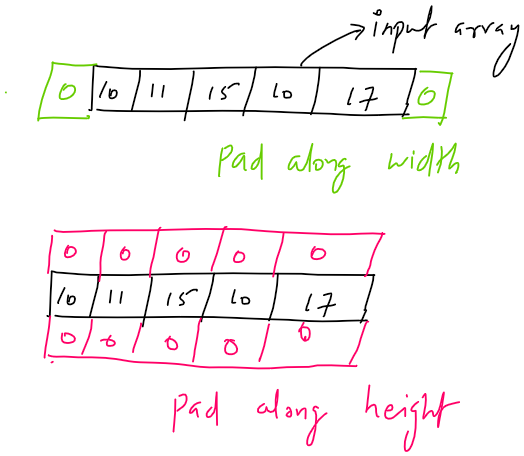
</ul>]]></content><author><name></name></author><category term="cpp" /><category term="python" /><category term="numpy" /><summary type="html"><![CDATA[Sometimes there will be situations where we need to pass data between CPP and Python codes. We can use Boost. Python to interface between CPP and Python. In this note, let’s see how to call CPP functions from Python and transfer Numpy arrays between them.]]></summary></entry><entry><title type="html">TensorFlow’s padding in convolution layer</title><link href="/2021/08/202108Padding-in-TensorFlow.html" rel="alternate" type="text/html" title="TensorFlow’s padding in convolution layer" /><published>2021-08-09T09:39:00+04:00</published><updated>2021-08-09T09:39:00+04:00</updated><id>/2021/08/Padding-in-TensorFlow</id><content type="html" xml:base="/2021/08/202108Padding-in-TensorFlow.html"><![CDATA[<p>Padding means expanding the input array with value (called pad value). The pad values (commonly zero) can be added along the height or width of the input array.</p>

<p><img src="https://raw.githubusercontent.com/mrtpk/kaizen/master/learnings/tensorflow_padding/resources/pad_along_width_height.png" alt="pad along width and height" /></p>

<p>The output shape of a convolution operation is defined as follows,</p>

\[output = \lfloor {\frac {(input - kernel + 2 * padding)} {stride}} \rfloor + 1\]

<p>The Convolution layer in TensorFlow has two types of padding- <code class="language-plaintext highlighter-rouge">VALID</code> and <code class="language-plaintext highlighter-rouge">SAME</code>.</p>

<h2 id="valid-padding">VALID padding</h2>
<p>In <code class="language-plaintext highlighter-rouge">VALID padding</code> no pad value is added to the input. Hence, the shape of the array is preserved. Below is the equation for the output shape.</p>

\[output\_height = \lfloor {\frac {(input\_height - kernel\_height)} {stride\_along\_height}} \rfloor + 1\]

\[output\_width = \lfloor {\frac {(input\_width - kernel\_width)} {stride\_along\_width}} \rfloor + 1\]

<h2 id="same-padding">SAME padding</h2>
<p>In <code class="language-plaintext highlighter-rouge">SAME padding</code> we have to pad such a way that,</p>

\[output\_height = \lceil {\frac {input\_height} {stride\_along\_height}} \rceil\]

\[output\_width = \lceil {\frac {input\_width} {stride\_along\_width}} \rceil\]

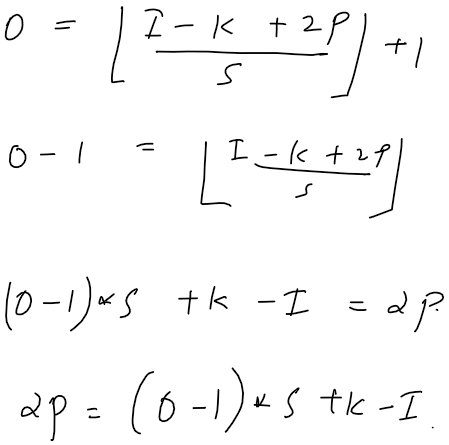
<p>To satisfy the above constraints, the input array has to be modified. From deriving the number of padding needed from the first equation, we get,</p>

<p><img src="https://raw.githubusercontent.com/mrtpk/kaizen/master/learnings/tensorflow_padding/resources/padding_derivation.png" alt="Derivation" /></p>

\[number\_of\_padding\_along\_height = (output\_height - 1) * stride\_along\_height - input\_height + kernel\_height\]

\[number\_of\_padding\_along\_width = (output\_width - 1) * stride\_along\_width - input\_width + kernel\_width\]

<p>Now that we have the number of padding along the height, we have to decide the number of paddings that has to be applied on the top and bottom of the input array. In TensorFlow, the padding for the top and bottom is calculated as follows,</p>

\[top\_padding = \lfloor \frac{number\_of\_padding\_along\_height}{2} \rfloor\]

\[bottom\_padding = number\_of\_padding\_along\_height - top\_padding\]

<p>The above equations imply that <code class="language-plaintext highlighter-rouge">bottom_padding</code> has higher priority than <code class="language-plaintext highlighter-rouge">top_padding</code>.</p>

<p>Similarly, for deciding padding for left and right,</p>

\[left\_padding = \lfloor \frac{number\_of\_padding\_along\_width}{2} \rfloor\]

\[right\_padding = number\_of\_padding\_along\_width - left\_padding\]

<p>The above equations imply that <code class="language-plaintext highlighter-rouge">right_padding</code> has higher priority than <code class="language-plaintext highlighter-rouge">left_padding</code>. It means that when the number of pad along width is one, then we should pad right.</p>

<p>Let’s look at the code.</p>

<figure class="highlight"><pre><code class="language-python" data-lang="python"><span class="k">def</span> <span class="nf">calculate_padding_for_same_pad</span><span class="p">(</span><span class="n">input_sz</span><span class="p">,</span> <span class="n">kernel_sz</span><span class="p">,</span> <span class="n">stride</span><span class="p">):</span>
    <span class="n">output_sz</span> <span class="o">=</span> <span class="n">np</span><span class="p">.</span><span class="nf">ceil</span><span class="p">(</span><span class="n">input_sz</span> <span class="o">/</span> <span class="n">stride</span><span class="p">)</span>
    <span class="n">total_pad</span> <span class="o">=</span> <span class="p">(</span><span class="n">output_sz</span> <span class="o">-</span> <span class="mi">1</span><span class="p">)</span> <span class="o">*</span> <span class="n">stride</span> <span class="o">-</span> <span class="n">input_sz</span> <span class="o">+</span> <span class="n">kernel_sz</span>
    <span class="n">low_priority_pad</span> <span class="o">=</span> <span class="n">total_pad</span> <span class="o">//</span> <span class="mi">2</span>
    <span class="n">high_priority_pad</span> <span class="o">=</span> <span class="n">total_pad</span> <span class="o">-</span> <span class="n">low_priority_pad</span>
    <span class="k">return</span> <span class="n">low_priority_pad</span><span class="p">,</span> <span class="n">high_priority_pad</span>
<span class="n">pad_top</span><span class="p">,</span> <span class="n">pad_bottom</span> <span class="o">=</span> <span class="nf">calculate_padding_for_same_pad</span><span class="p">(</span><span class="n">input_sz_h</span><span class="p">,</span> <span class="n">kernel_sz_h</span><span class="p">,</span> <span class="n">stride_h</span><span class="p">)</span>
<span class="n">pad_left</span><span class="p">,</span> <span class="n">pad_right</span> <span class="o">=</span> <span class="nf">calculate_padding_for_same_pad</span><span class="p">(</span><span class="n">input_sz_w</span><span class="p">,</span> <span class="n">kernel_sz_w</span><span class="p">,</span> <span class="n">stride_w</span><span class="p">)</span></code></pre></figure>

<p><strong>Reference:</strong></p>
<ul>
  <li><a href="https://stackoverflow.com/a/66054593/6561141">What is the behavior of SAME padding when stride is greater than 1?</a></li>
  <li><a href="https://mmuratarat.github.io/2019-01-17/implementing-padding-schemes-of-tensorflow-in-python">Padding schemes in TensorFlow</a></li>
</ul>]]></content><author><name></name></author><category term="deep-learning" /><category term="TensorFlow" /><category term="Keras" /><summary type="html"><![CDATA[Padding means expanding the input array with value (called pad value). The pad values (commonly zero) can be added along the height or width of the input array.]]></summary></entry><entry><title type="html">[draft] Convolution and correlation</title><link href="/2019/10/201910Convolution-and-correlation.html" rel="alternate" type="text/html" title="[draft] Convolution and correlation" /><published>2019-10-03T19:50:00+04:00</published><updated>2019-10-03T19:50:00+04:00</updated><id>/2019/10/Convolution-and-correlation</id><content type="html" xml:base="/2019/10/201910Convolution-and-correlation.html"><![CDATA[<p>Convolution operation(denoted as $\ast$) between two signals, $f(t)$ and $g(t)$ is</p>

\[(f\ast g)(t) = \sum_a f(a) \cdot g(t-a)\]

<p>In convolution the signal $g(t)$ is flipped and convolved(passed through) on the input signal $f(t)$. Using convolution we look for what will be the output of the filter, $g(t)$ when it’s input is $x(t)$.</p>

<p>Using correlation we check whether a signal $g(t)$ is present in a given noisy signal $x(t)$. One pratical application is template matching in computer vision. The correlation is given by</p>

\[(f\ast g)(t) = \sum_t f(t) \cdot g(t-a)\]

<p>TODO: Relationship between convolution and correlation using Numpy</p>

<p>TODO: Relationship between convolution, correlation and fft</p>

<p><strong>Reference:</strong></p>
<ul>
  <li><a href="https://www.dspguide.com/ch7/3.htm">A guide on convolution and correlation</a></li>
  <li><a href="http://colah.github.io/posts/2014-07-Understanding-Convolutions/">Understanding convolutions</a></li>
  <li><a href="https://dsp.stackexchange.com/questions/27451/the-difference-between-convolution-and-cross-correlation-from-a-signal-analysis/27453#comment122905_27453">Difference between convolution and correlation</a></li>
  <li><a href="[https://stackoverflow.com/questions/58181398/how-to-find-correlation-between-two-images-using-numpy]">Correlation of two images using FFT</a></li>
</ul>]]></content><author><name></name></author><category term="deep-learning," /><category term="DSP" /><summary type="html"><![CDATA[Convolution operation(denoted as $\ast$) between two signals, $f(t)$ and $g(t)$ is]]></summary></entry><entry><title type="html">YOLO Annotation</title><link href="/2019/09/201909YOLO-annotation.html" rel="alternate" type="text/html" title="YOLO Annotation" /><published>2019-09-30T20:07:00+04:00</published><updated>2019-09-30T20:07:00+04:00</updated><id>/2019/09/YOLO-annotation</id><content type="html" xml:base="/2019/09/201909YOLO-annotation.html"><![CDATA[<p>Lately, I have been <a href="https://www.analyticsvidhya.com/blog/2018/12/practical-guide-object-detection-yolo-framewor-python/">reading about YOLO</a> and this note is about how the annotations are stored for training YOLO.</p>

<p>Each image in the dataset should have a corresponding <code class="language-plaintext highlighter-rouge">txt</code> file. The bounding box in the image is represented by each line in the text file. The syntax of the line is as follows:</p>

<p><code class="language-plaintext highlighter-rouge">class_id x y w h</code></p>

<p><code class="language-plaintext highlighter-rouge">x</code> and <code class="language-plaintext highlighter-rouge">y</code> are coordinates of the mid point of the bounding box. <code class="language-plaintext highlighter-rouge">w</code> and <code class="language-plaintext highlighter-rouge">h</code> are the width and height of the bounding box. The values for <code class="language-plaintext highlighter-rouge">x</code>, <code class="language-plaintext highlighter-rouge">y</code>, <code class="language-plaintext highlighter-rouge">w</code> and <code class="language-plaintext highlighter-rouge">h</code> are expressed relative to the image(ratio).</p>

<p>Let’s say, <code class="language-plaintext highlighter-rouge">im_w</code> and <code class="language-plaintext highlighter-rouge">im_h</code> are the width and height of an image, and <code class="language-plaintext highlighter-rouge">(x_min, y_min)</code> and <code class="language-plaintext highlighter-rouge">(x_max, y_max)</code> are two diagonally opposite coordinates of a bounding box. To convert them into YOLO metrics, we find the midpoint of the bounding box- <code class="language-plaintext highlighter-rouge">((x_min + x_max) / 2 , (y_min + y_max) / 2)</code>. The width and height of bounding box is given by <code class="language-plaintext highlighter-rouge">x_max - x_min</code> and <code class="language-plaintext highlighter-rouge">y_max - y_min</code>. Then to express the values relative to image, we divide these values by <code class="language-plaintext highlighter-rouge">im_w</code> and <code class="language-plaintext highlighter-rouge">im_h</code>.</p>

<p><code class="language-plaintext highlighter-rouge">x</code> = <code class="language-plaintext highlighter-rouge">(x_min + x_max) / (2 * im_w)</code></p>

<p><code class="language-plaintext highlighter-rouge">y</code> = <code class="language-plaintext highlighter-rouge">(y_min + y_max) / (2 * im_h)</code></p>

<p><code class="language-plaintext highlighter-rouge">w</code> = <code class="language-plaintext highlighter-rouge">(x_max - x_min) / im_w</code></p>

<p><code class="language-plaintext highlighter-rouge">h</code> = <code class="language-plaintext highlighter-rouge">(y_max - y_min) / im_h</code></p>

<p>Below is the Python code.</p>

<figure class="highlight"><pre><code class="language-python" data-lang="python"><span class="k">def</span> <span class="nf">convert</span><span class="p">(</span><span class="n">im_w</span><span class="p">,</span> <span class="n">im_h</span><span class="p">,</span> <span class="n">x_min</span><span class="p">,</span> <span class="n">x_max</span><span class="p">,</span> <span class="n">y_min</span><span class="p">,</span> <span class="n">y_max</span><span class="p">):</span>
    <span class="n">dw</span> <span class="o">=</span> <span class="mf">1.</span><span class="o">/</span><span class="n">im_w</span>
    <span class="n">dh</span> <span class="o">=</span> <span class="mf">1.</span><span class="o">/</span><span class="n">im_h</span>
    <span class="n">x</span> <span class="o">=</span> <span class="p">(</span><span class="n">x_min</span> <span class="o">+</span> <span class="n">x_max</span><span class="p">)</span><span class="o">/</span><span class="mf">2.0</span>
    <span class="n">y</span> <span class="o">=</span> <span class="p">(</span><span class="n">y_min</span> <span class="o">+</span> <span class="n">y_max</span><span class="p">)</span><span class="o">/</span><span class="mf">2.0</span>
    <span class="n">w</span> <span class="o">=</span> <span class="n">x_max</span> <span class="o">-</span> <span class="n">x_min</span>
    <span class="n">h</span> <span class="o">=</span> <span class="n">y_max</span> <span class="o">-</span> <span class="n">y_min</span>
    <span class="n">x</span> <span class="o">=</span> <span class="n">x</span><span class="o">*</span><span class="n">dw</span>
    <span class="n">w</span> <span class="o">=</span> <span class="n">w</span><span class="o">*</span><span class="n">dw</span>
    <span class="n">y</span> <span class="o">=</span> <span class="n">y</span><span class="o">*</span><span class="n">dh</span>
    <span class="n">h</span> <span class="o">=</span> <span class="n">h</span><span class="o">*</span><span class="n">dh</span>
    <span class="nf">return </span><span class="p">(</span><span class="n">x</span><span class="p">,</span><span class="n">y</span><span class="p">,</span><span class="n">w</span><span class="p">,</span><span class="n">h</span><span class="p">)</span>

<span class="k">def</span> <span class="nf">deconvert</span><span class="p">(</span><span class="n">im_w</span><span class="p">,</span> <span class="n">im_h</span><span class="p">,</span> <span class="n">x</span><span class="p">,</span> <span class="n">y</span><span class="p">,</span> <span class="n">w</span><span class="p">,</span> <span class="n">h</span><span class="p">):</span>
    <span class="n">ox</span> <span class="o">=</span> <span class="nf">float</span><span class="p">(</span><span class="n">x</span><span class="p">)</span>
    <span class="n">oy</span> <span class="o">=</span> <span class="nf">float</span><span class="p">(</span><span class="n">y</span><span class="p">)</span>
    <span class="n">ow</span> <span class="o">=</span> <span class="nf">float</span><span class="p">(</span><span class="n">w</span><span class="p">)</span>
    <span class="n">oh</span> <span class="o">=</span> <span class="nf">float</span><span class="p">(</span><span class="n">h</span><span class="p">)</span>
    <span class="n">x</span> <span class="o">=</span> <span class="n">ox</span><span class="o">*</span><span class="n">im_w</span>
    <span class="n">y</span> <span class="o">=</span> <span class="n">oy</span><span class="o">*</span><span class="n">im_h</span>
    <span class="n">w</span> <span class="o">=</span> <span class="n">ow</span><span class="o">*</span><span class="n">im_w</span>
    <span class="n">h</span> <span class="o">=</span> <span class="n">oh</span><span class="o">*</span><span class="n">im_h</span>
    <span class="n">xmax</span> <span class="o">=</span> <span class="p">(((</span><span class="mi">2</span><span class="o">*</span><span class="n">x</span><span class="p">)</span><span class="o">+</span><span class="n">w</span><span class="p">)</span><span class="o">/</span><span class="mi">2</span><span class="p">)</span>
    <span class="n">xmin</span> <span class="o">=</span> <span class="n">xmax</span><span class="o">-</span><span class="n">w</span>
    <span class="n">ymax</span> <span class="o">=</span> <span class="p">(((</span><span class="mi">2</span><span class="o">*</span><span class="n">y</span><span class="p">)</span><span class="o">+</span><span class="n">h</span><span class="p">)</span><span class="o">/</span><span class="mi">2</span><span class="p">)</span>
    <span class="n">ymin</span> <span class="o">=</span> <span class="n">ymax</span><span class="o">-</span><span class="n">h</span>
    <span class="k">return</span> <span class="p">[</span><span class="nf">int</span><span class="p">(</span><span class="n">xmin</span><span class="p">),</span><span class="nf">int</span><span class="p">(</span><span class="n">ymin</span><span class="p">),</span><span class="nf">int</span><span class="p">(</span><span class="n">xmax</span><span class="p">),</span><span class="nf">int</span><span class="p">(</span><span class="n">ymax</span><span class="p">)]</span></code></pre></figure>

<p><a href="https://github.com/ManivannanMurugavel">Manivannan</a> has shared an annotation <a href="https://github.com/ManivannanMurugavel/Yolo-Annotation-Tool-New-/">tool</a> and wrote about <a href="https://medium.com/@manivannan_data/yolo-annotation-tool-new-18c7847a2186">how to use it</a>. Please note that his tool is in Python 2 and with some edits will work on Python 3.</p>]]></content><author><name></name></author><category term="deep-learning" /><summary type="html"><![CDATA[Lately, I have been reading about YOLO and this note is about how the annotations are stored for training YOLO.]]></summary></entry><entry><title type="html">Why you should be interested in LiDAR technologies?</title><link href="/2018/08/201808lidar-tech.html" rel="alternate" type="text/html" title="Why you should be interested in LiDAR technologies?" /><published>2018-08-26T22:30:00+04:00</published><updated>2018-08-26T22:30:00+04:00</updated><id>/2018/08/lidar-tech</id><content type="html" xml:base="/2018/08/201808lidar-tech.html"><![CDATA[<p>This post was originally <a href="https://medium.com/hackernoon/why-you-should-be-interested-in-lidar-technologies-62cada5919d/" target="_blank" rel="noopener noreferrer">written on Medium</a>.</p>]]></content><author><name></name></author><category term="lidar" /><summary type="html"><![CDATA[This post was originally written on Medium.]]></summary></entry><entry><title type="html">LiDAR Basics - The Coordinate System</title><link href="/2018/08/201808lidar-coordinates.html" rel="alternate" type="text/html" title="LiDAR Basics - The Coordinate System" /><published>2018-08-26T22:30:00+04:00</published><updated>2018-08-26T22:30:00+04:00</updated><id>/2018/08/lidar-coordinates</id><content type="html" xml:base="/2018/08/201808lidar-coordinates.html"><![CDATA[<p>This post was originally <a href="https://medium.com/hackernoon/lidar-basics-the-coordinate-system-a26529615df9" target="_blank" rel="noopener noreferrer">written on Medium</a>.</p>]]></content><author><name></name></author><category term="lidar" /><summary type="html"><![CDATA[This post was originally written on Medium.]]></summary></entry><entry><title type="html">An introduction to ‘Swarm-Enabling Technology for Multi-Robot Systems’</title><link href="/2018/05/201805swarm-robotics.html" rel="alternate" type="text/html" title="An introduction to ‘Swarm-Enabling Technology for Multi-Robot Systems’" /><published>2018-05-09T22:30:00+04:00</published><updated>2018-05-09T22:30:00+04:00</updated><id>/2018/05/swarm-robotics</id><content type="html" xml:base="/2018/05/201805swarm-robotics.html"><![CDATA[<p>This post was originally <a href="https://medium.com/@mrtpk/paper-overview-swarm-enabling-technology-for-multi-robot-systems-bcdd026fe433/" target="_blank" rel="noopener noreferrer">written on Medium</a>.</p>]]></content><author><name></name></author><category term="robotics" /><summary type="html"><![CDATA[This post was originally written on Medium.]]></summary></entry></feed>